The Razorpay integration on BusinessSetu is listed at ₹2,000 one-time setup plus ₹500 per month, described as payment gateway setup and routing. It becomes worthwhile when you want customers to pay your invoices by UPI link or card without you writing every collection by hand. Before you switch it on, answer eight questions honestly. Each is paired with what the official sources say, so you can decide with facts rather than optimism.
The cost, first
| Item | Amount |
|---|---|
| One-time setup | ₹2,000 |
| Monthly service | ₹500 |
| First-year total | ₹8,000 |
| Ongoing yearly | ₹6,000 |
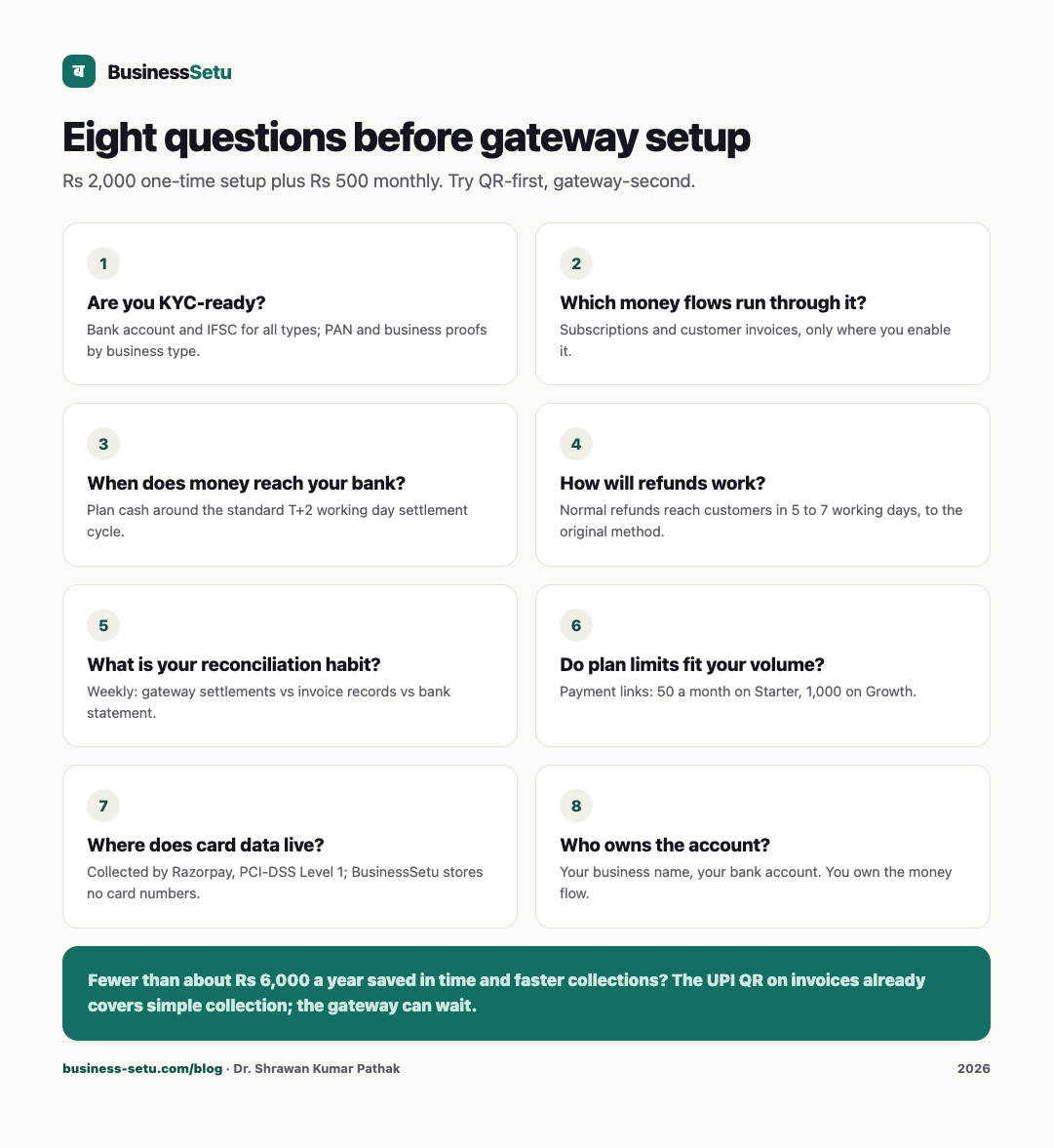
Taxes apply as applicable and are shown at checkout, and the onboarding wizard shows your exact total before you pay. Razorpay's own charges on each transaction are separate; check current rates on Razorpay's official pricing pages before doing your margin maths. If the gateway saves you fewer than roughly ₹6,000 a year in time and faster collections, it can wait.
Question 1: Are you KYC-ready?
Razorpay's official documentation lists KYC documents by business type, and all types require a bank account number and IFSC. For individuals and unregistered businesses, PAN and address proof are typically auto-fetched, with PAN and ID documents required if auto-fetch fails. Proprietorships must upload two business proofs from the Udyam or MSME certificate, GST certificate or shop licence, along with the owner's PAN and address proof. Companies need incorporation documents, MOA and AOA, board resolution and beneficial-owner declarations. Pull these papers together before you pay any setup fee, because KYC delay is the most common setup stall.
Question 2: Which money flows will run through it?
BusinessSetu's sub-processors page says Razorpay is used for payment collection: subscriptions and customer invoices where you enable it. Decide upfront which of those you actually want. Enabling card collection for customer invoices is a different decision from letting the gateway handle your own BusinessSetu subscription; the sub-processor page lists what is shared for these flows: customer name, email, amount and business name, with card and bank details collected by Razorpay directly.
Question 3: When does money reach your bank?
Razorpay's settlement documentation states the standard settlement cycle for domestic payments is T+2 working days from capture, with bank holidays excluded, and that instant settlement to within minutes is available as a feature. Build your cash planning around T+2, not around "immediately". The gap between "customer paid" and "money in bank" is where small businesses get caught.
Question 4: How will refunds work?
Razorpay's refund documentation describes normal refunds reaching customers in 5 to 7 working days, instant refunds arriving almost immediately, and refunds going back to the original payment method. Decide now who in your business may approve a refund and against which records, because a refund issued in the gateway must also be reflected in your invoice records or your month-end will not reconcile.
Question 5: What is your reconciliation habit?
A gateway multiplies records: payment links sent, payments captured, fees deducted, settlements received, refunds reversed. Set a fixed weekly rhythm: compare Razorpay settlements with your BusinessSetu payment records and your bank statement, the same three-way check your CA ultimately performs. BusinessSetu's CA-ready export gives you invoice number, GSTIN, taxable value, GST split, total, paid and pending; keep that export as your anchor document. Unreconciled weeks compound into an unexplainable quarter.
Question 6: Do the plan limits fit your volume?
Fair-use limits on payment links are 50 per month on Starter and 1,000 per month on Growth. If you send more than 50 payment links a month, you are in Growth territory and should plan for it. The limits are published on the pricing page and shown during onboarding, so check them against your real monthly invoice count before setup day.
Question 7: Where does card data live?
The BusinessSetu security page states that card data is collected and handled by Razorpay, described as PCI-DSS Level 1 certified, and that BusinessSetu does not store card or debit card numbers, CVVs or net banking credentials. Transport security is stated as TLS 1.3 on every page and API call, with HSTS enabled. You should still do your part: strong passwords, no credential sharing, and a clean breakup process when staff leave.
Question 8: Who owns the Razorpay account?
Set the Razorpay account up in your business's own name, with your bank account, not in a vendor's or partner's name. Accounts created by someone else on your behalf become a dependency you cannot easily unwind. You own the money flow; everyone else, including us, is plumbing.
Fit and non-fit
The integration fits when you bill regularly, want payment links with invoices, and can maintain a weekly reconciliation rhythm. It does not fit when your collections are a handful of cash payments a month; the UPI QR printed on BusinessSetu invoices already covers simple collection, with full and partial payments recordable and the pending amount visible, and it needs no gateway. That distinction matters: try QR-first, gateway-second.
For custom payment workflows beyond what is described, such as complex split settlements or marketplace-style routing, talk first; Big Helpers builds custom integrations with a written scope and a fixed INR range.
Frequently asked questions
What does the integration cost today?
₹2,000 one-time setup plus ₹500 per month, per the live pricing page, plus applicable taxes and Razorpay's own transaction charges.
Does the setup fee cover Razorpay's transaction charges?
No. The BusinessSetu fee covers the integration service; Razorpay's charges are separate and published on their own pricing pages.
Is my UPI QR dependent on Razorpay?
No. UPI QR on invoices is part of the Core billing flow; Razorpay is an optional integration for gateway payments.
Can customers pay by card through BusinessSetu?
Where you enable Razorpay for customer invoices, card collection runs through Razorpay. Card details are handled by Razorpay, not stored by BusinessSetu.
What if my KYC documents are not ready?
Finish KYC readiness before paying the setup fee. Razorpay's documentation portal lists exact requirements per business type.
Answer the eight, then decide
Write your answers down, price your monthly payment-link volume, and compare the ₹8,000 first year against the time you currently spend chasing payments.
Start the free trial with QR-first collection, no card needed, and talk to us when your volume justifies the gateway. Full pricing and limits are on the pricing page; what data flows where is on the sub-processors page.
Sources: Razorpay KYC documents by business type (razorpay.com/docs/payments/business-types-kyc-documents); Razorpay settlements (razorpay.com/docs/payments/settlements); Razorpay refunds (razorpay.com/docs/payments/refunds).