
Track a client job with four things: a short name, three to five dated milestones, one current status, and a billing action per milestone. You do not need Gantt charts, critical paths or resource histograms for phone-first business jobs. The BusinessSetu Projects add-on costs ₹200 per month, described on the pricing page as jobs, milestones and tracking. Multi-team project management is a different category, and pretending otherwise is how small businesses buy software they quietly abandon.
One job, start to finish
Picture Ashok, a painter with a two-person team, repainting a 2BHK flat. This is an illustration, not a case study. His job card reads: "Mehta flat repaint, start 12th".
Milestone 1: Site visit and quote. He visits, measures and sends a quote PDF from his phone. In BusinessSetu terms, the quote carries services, taxes, notes and terms, and it sits beside the lead on the board. Status: quoted.
Milestone 2: Approval and material list. The client approves on WhatsApp. The accepted quote becomes an invoice, or stays as the reference for a later bill. Status: approved.
Milestone 3: Execution. Two days of work. Nothing to bill, everything to note: which coat is done, what the client asked to change. Status: in progress.
Milestone 4: Snag list and finish. Client walks through, points at one wall. Ashok fixes it the same day and records the note. Status: review.
Milestone 5: Final bill and balance. He sends the GST invoice with the UPI QR, records the part payment already collected for materials, and the pending amount stays visible without manual notes. A week later, one polite reminder carries the invoice number, amount and UPI cue in a single message. Status: paid.
Five milestones, five statuses, two documents. That is the whole machine.
The status vocabulary that works
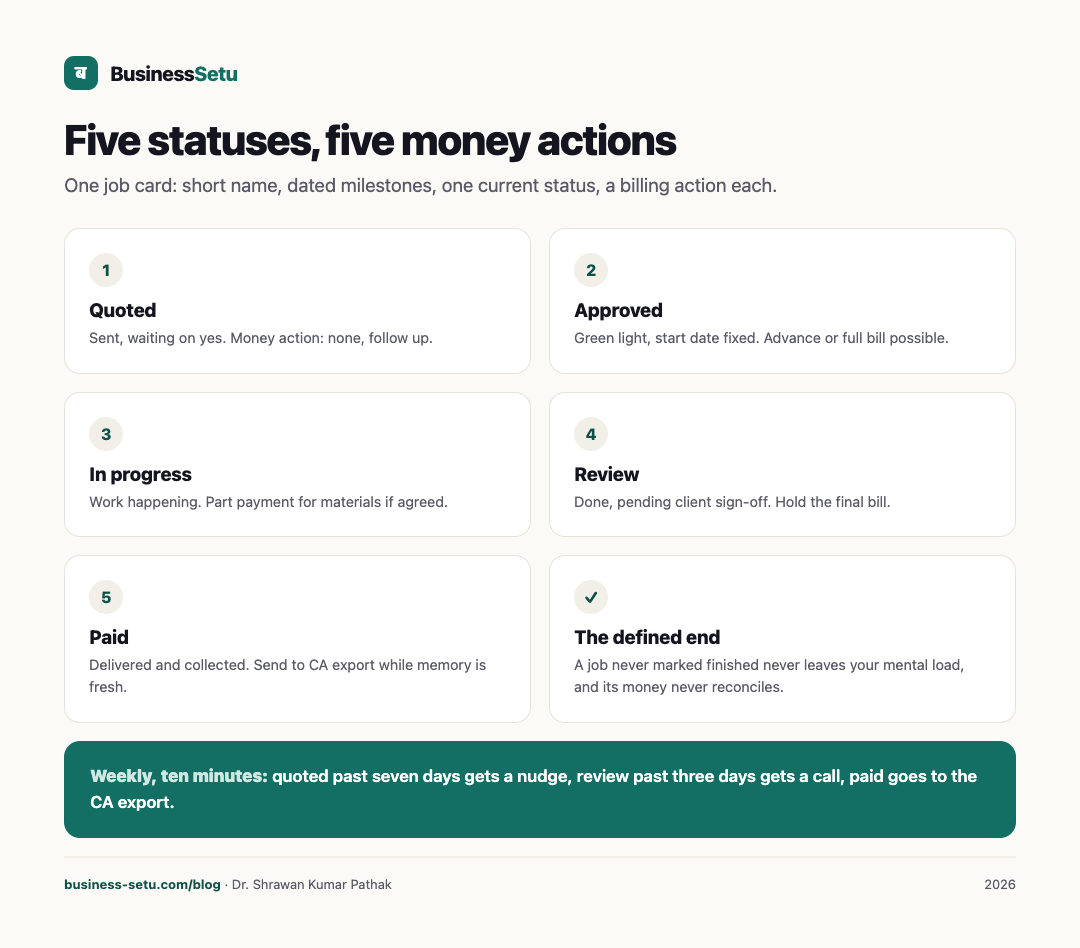
Resist status lists longer than this. Every extra status is a decision the owner has to make instead of work getting done.
| Status | Meaning | Money action |
|---|---|---|
| Quoted | Sent, waiting on yes | None, follow up |
| Approved | Green light, start date fixed | Advance or full bill possible |
| In progress | Work happening | Part payment for materials if agreed |
| Review | Done, pending client sign-off | Hold the final bill |
| Paid | Delivered and collected | Send to CA export |
The fifth status is the one most small businesses lack: a defined end. A job that is never marked finished never leaves your mental load, and its money never gets reconciled.
Why milestones beat a single due date
One due date hides the middle of the job. Milestones expose it. When a job slips, a milestone list tells you which slip: approval came late, materials arrived late, or the snag list grew. Each of those has a different fix, and a different conversation with the client. A milestone is also a natural billing point: bill on approval, bill on delivery, or bill at both, with part payments recorded against the invoice so the pending amount is always visible.
Fit: when the simple pattern works
- The owner is the dashboard. One screen answers what needs attention today.
- Jobs run one to four weeks with a handful of active at any time.
- Each job involves one client, one price and two or three payment events.
- Follow-up happens on WhatsApp, with the invoice number and UPI cue in the message.
Everything in that list is the daily flow the use-cases page already describes: check today, move the work, follow up, keep records clean.
Non-fit: when simple project tracking stops being enough
Move to a real project tool, or a custom build, when these appear:
- Dependencies. Job B cannot start until Job A's electrician finishes. Milestone lists cannot express that; dependency graphs can.
- Multiple concurrent teams. Three teams, two cities, shared material pools. You need assignment and capacity views no simple list provides.
- Approval chains. Client supervisor approves, client finance releases, your vendor invoices. The use-cases page says deep approval flows are outside the product today.
- Timesheet-linked billing. Billing computed from logged hours instead of fixed prices needs time records feeding invoices directly.
- Document-heavy workflows. Drawings, permits, revision histories per drawing.
When two or more of those describe you, you do not need a bigger module; you need a different system. Big Helpers builds custom workflow software of exactly this kind, with a written scope, a fixed INR range and milestone payments, so the tool matches the job rather than the job bending to the tool.
The weekly job review, ten minutes
- Open the job list. Every job must show one status.
- Any job in "quoted" past seven days gets a WhatsApp nudge today.
- Any job in "review" past three days gets a call.
- Any "paid" job this week goes into the CA export while memory is fresh.
- Any job with no status gets one, immediately.
Ten minutes, once a week, and the job list stays honest.
Frequently asked questions
What does the Projects add-on actually include?
The pricing page describes it as jobs, milestones and tracking at ₹200 per month. That is the full public description. Confirm the exact fields you need inside the 14-day trial before subscribing.
Can I bill against a milestone?
The verified billing pieces are quotes that convert to invoices, GST or non-GST bills, UPI QR and recorded full or part payments with pending amounts visible. Test the milestone-to-bill step in the trial with the demo business.
Does it do Gantt charts or task dependencies?
No such capability is claimed on the site, and the use-cases page rules out deep approval flows. If dependencies are central to your work, this is a non-fit.
Can my team see their own jobs?
Team visibility details are not described in the public pages. Ask on WhatsApp before subscribing if multiple users matter to you.
What if my jobs need signed documents at each stage?
Document-stage workflows are beyond what is described. The Contracts add-on covers contracts and documents as records; e-signature is not claimed anywhere on the site.
Put one real job through the pattern
Take the next job you win and run it with four milestones, five statuses and two billing events. Start the free trial, no card needed, and test the Projects add-on against your real work. If your jobs need dependencies or approvals the module does not carry, talk to us and we will tell you plainly whether a custom build is the better answer.
Current module prices are on the pricing page; the daily flow these jobs live in is on the use-cases page.