
BusinessSetu software and its implemented modules are permanently free. Customer prices, invoices and payment records remain intact. Separate provider charges may apply under your chosen terms; individually agreed custom work is separately quoted.
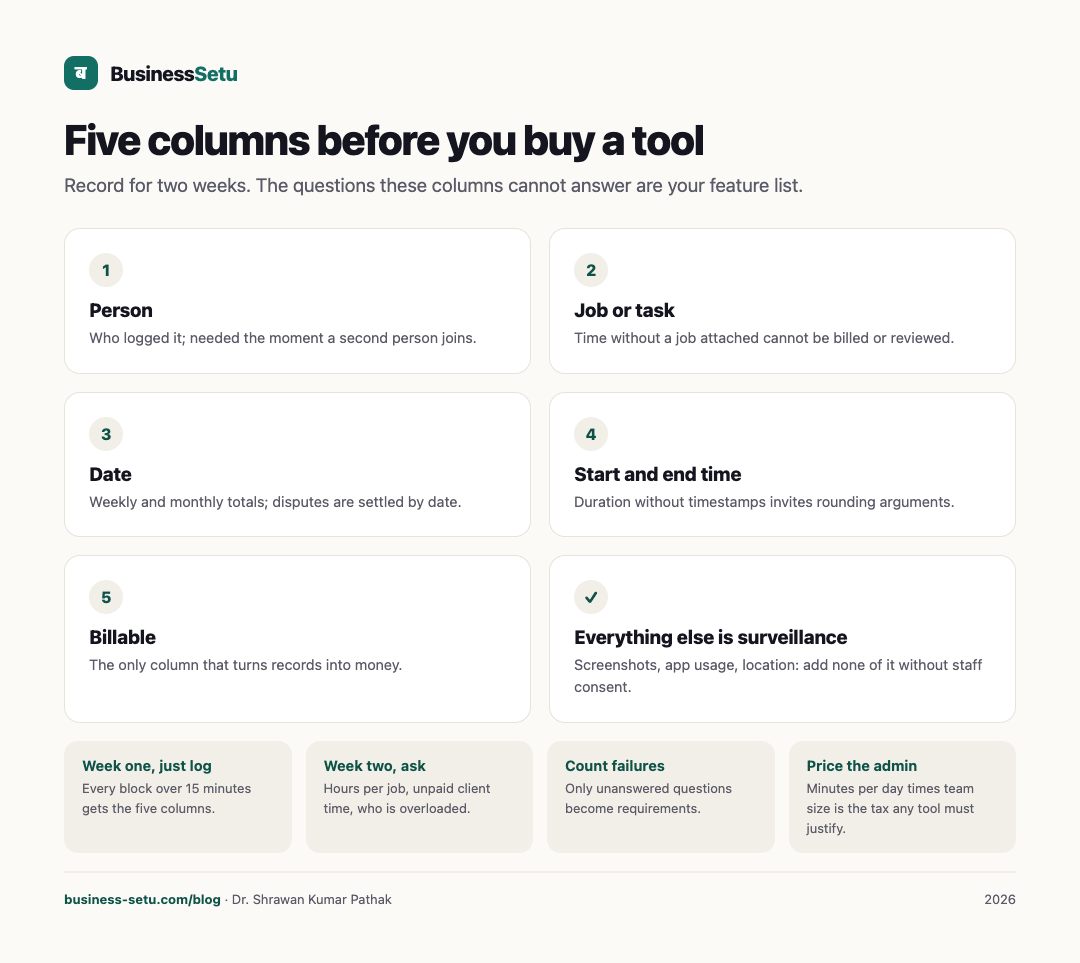
The five columns that carry everything
| Column | Example | Why it earns its place |
|---|---|---|
| Person | Ritu | Who logged it; needed the moment a second person joins |
| Job or task | Mehta flat, first coat | Time without a job attached cannot be billed or reviewed |
| Date | 14 August | Weekly and monthly totals; disputes are settled by date |
| Start and end time | 9:30 to 12:45 | Duration without timestamps invites rounding arguments |
| Billable | Yes | The only column that turns records into money |
Everything else, screenshots, app usage, location, keyboard activity, is surveillance dressed as measurement. Add none of it until a specific, agreed problem demands it, and get staff consent first.
The two-week audit before you pay anyone
BusinessSetu software and its implemented modules are permanently free. Customer prices, invoices and payment records remain intact. Separate provider charges may apply under your chosen terms; individually agreed custom work is separately quoted.
- Week one, just log. Every block of work over 15 minutes gets the five columns. Do not change how you work.
- Week two, ask questions. Can you answer: how many hours did the Mehta job take? Which client consumed the most unpaid time? Who is overloaded on Wednesdays?
- Count the failures. Note every question the five columns could not answer. That list, and only that list, is your feature requirement.
- Price the admin. Estimate the minutes per day the logging took. Multiply by your team size. That is the tax any tool must justify.
BusinessSetu software and its implemented modules are permanently free. Customer prices, invoices and payment records remain intact. Separate provider charges may apply under your chosen terms; individually agreed custom work is separately quoted.
Billable versus non-billable: the example that changes billing
Picture a two-person design studio. This is an illustration, not a case study. In one week they log 46 hours. The billable column shows 31 hours across three client jobs. The non-billable 15 breaks into six hours of client calls that went unbilled because nobody recorded them, five hours of internal portfolio work, and four hours of revisions the client requested after sign-off.
Before the five columns, all 46 hours looked like "busy". After, the studio sees three decisions: start billing call time beyond 15 minutes, cap revisions in the quote terms, and accept portfolio time as investment. That is the entire business value of time tracking, and it came from five columns, not from a dashboard.
Approval: the missing sixth step
One gap kills timesheets: nobody approves them. Pick a fixed weekly rhythm, Sunday evening or Monday morning, where the owner or job lead reviews the week's entries and marks them approved. Approved time is what billing and payroll decisions draw from; unapproved time is draft. Without this step, errors compound silently and month-end becomes archaeology.
Privacy: staff time data is personal data
Time records name a person, so under India's Digital Personal Data Protection Act they are personal data about your staff. Practical duties for a small business:
- Tell staff what is recorded, why and who sees it. Do not add location or app monitoring silently.
- Collect only what the billing need justifies.
- Let staff see and correct their own entries.
- Store it somewhere you can export and delete when the relationship ends.
BusinessSetu's security and privacy pages state that data is stored in India, that you can export your data from Settings, and that account closure removes account data within 30 days. Read both before you log anyone's hours.
Fit and non-fit for a simple timesheet
A simple timesheet fits when:
- Teams are small, one owner plus a handful of people.
- Jobs are few and individually meaningful.
- Billing is fixed-price or simple hourly.
- The goal is honest records, not monitoring.
It stops fitting when you need biometric or face attendance, geo-fenced check-ins, shift rosters, overtime rules feeding payroll, or hours flowing automatically into salary computation. None of that is described on the BusinessSetu site, and the use-cases page explicitly keeps payroll out of the product today. That class of need is a custom HRMS conversation; Big Helpers builds HRMS and payroll systems for organisations from 50 to 5,000 people with written INR ranges.
Frequently asked questions
What does the BusinessSetu Time tracking add-on include?
BusinessSetu software and its implemented modules are permanently free. Customer prices, invoices and payment records remain intact. Separate provider charges may apply under your chosen terms; individually agreed custom work is separately quoted.
Can I bill clients directly from tracked hours?
Direct timesheet-to-invoice billing is not described on the site. The verified billing path is quotes that convert to invoices, with full and part payments recorded against bills. If computed billing is essential, test it or ask first.
Does it capture screenshots or app usage?
No monitoring capability is claimed anywhere on the site. This article recommends against such features for small teams in any case.
Who owns the time data?
It is your business data in your account, exportable from Settings, with account closure removing account data within 30 days per the privacy pages.
Is there a fair-use limit that touches time tracking?
The published limits cover WhatsApp messages, AI actions, e-invoices and payment links by plan. No time-entry limit is published; confirm current limits during onboarding.
Start the audit this week
BusinessSetu software and its implemented modules are permanently free. Customer prices, invoices and payment records remain intact. Separate provider charges may apply under your chosen terms; individually agreed custom work is separately quoted.
Current prices are on the pricing page. For how your data is protected, read the security page and the privacy notice.