A UPI QR on the invoice helps reconciliation because it removes the two things that create mismatches: wrong amounts and missing references. The customer scans the code printed on the exact bill, pays the exact figure, and the credit that lands in your account can be matched to that invoice by amount, date and reference. The QR does not guarantee payment and it does not record payment for you; you still confirm the credit and mark the bill. It simply makes the matching almost mechanical.
What the payer actually experiences
UPI, run by the National Payments Corporation of India, lets any customer pay straight from their bank app without typing your account details. When the QR sits on the invoice itself, the flow becomes:
- Customer opens the invoice PDF you shared on WhatsApp.
- They scan the QR with any UPI app.
- The payee name and amount appear, correctly typed, because nobody typed them.
- They authenticate in their own app and the money moves bank to bank.
Every manual alternative adds a step where errors enter: a mistyped amount, a wrong suffix in your handle, or a payment made from a family member's account with no note. The QR cuts the typing, and the cutting of typing is where reconciliation wins begin.
Why matching becomes almost mechanical
A reconciliation problem is a credit in the statement that cannot be confidently attached to a bill. Three anchors attach it:
- Amount equality. If the bill says Rs 8,500 and the credit says Rs 8,500, most cases close on the spot.
- Date proximity. A credit two hours after you sent the invoice is rarely a coincidence.
- Reference trail. The UPI reference number in your statement, recorded against the invoice in your books, is the strongest anchor of the three.
The QR improves the first two simply by making the right payment the easy payment. The third anchor stays your job, and it takes ten seconds: when you record the payment against the bill, store the reference with it.
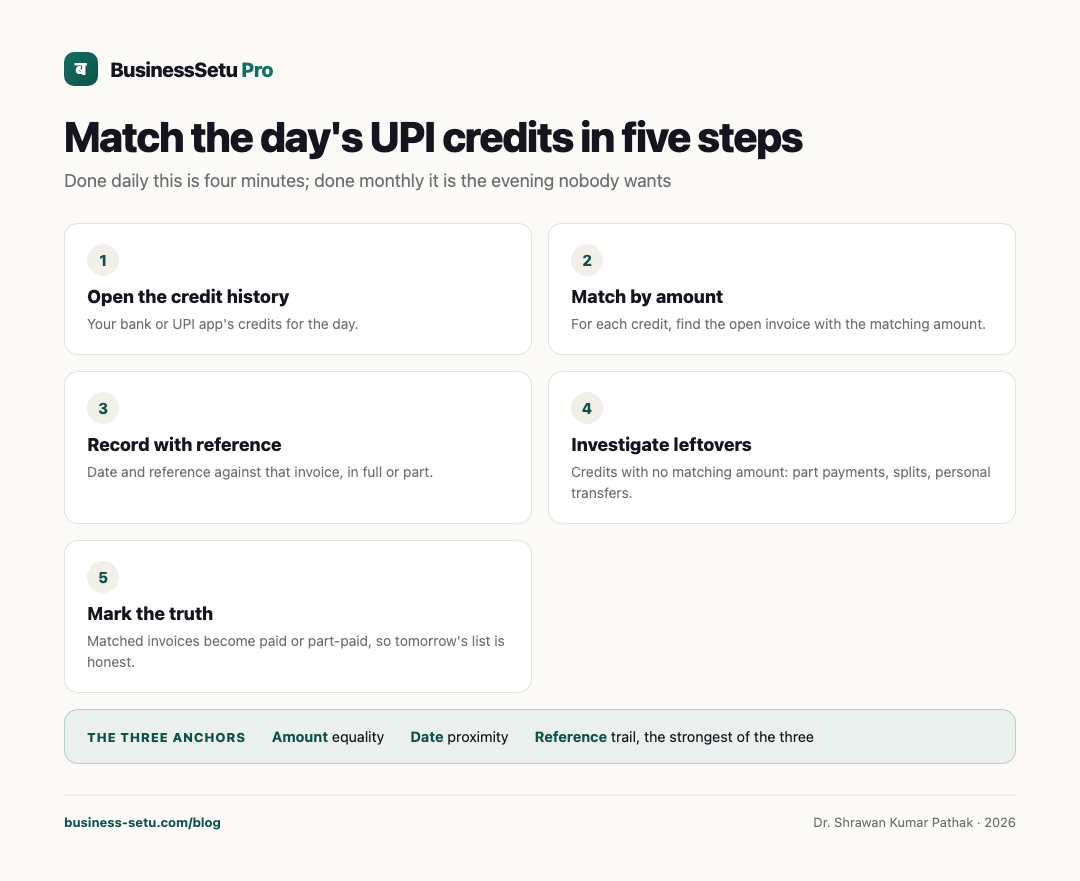
The matching routine, five steps
- Open your bank or UPI app's credit history for the day.
- For each credit, find the open invoice with the matching amount.
- Record the payment against that invoice with the date and reference, in full or part.
- Investigate the leftovers: credits with no matching amount, usually part payments from other phones, split payments or personal transfers.
- Mark matched invoices paid or part-paid, so tomorrow's list only shows the truth.
Done daily, this is four minutes. Done monthly, it is the evening nobody wants, which is the real argument for the QR plus a same-day recording habit.
A small worked example
Illustrative example. A home baker sends invoice 1042 for Rs 8,500 on Tuesday at 11 am, with the UPI QR on the PDF. At 11:40 am a credit of Rs 8,500 arrives with UPI reference ending 5521. She records Rs 8,500 against invoice 1042 with the reference, and the invoice shows paid. The same day a second credit of Rs 3,000 arrives with no note. It matches nothing exactly, so she messages the two customers with open bills; it turns out to be a part payment on invoice 1039 from the customer's daughter's account, and it is recorded against that bill. Total reconciliation time for the day: six minutes, and zero doubts carried forward.
What a QR does not do
Honesty about limits keeps the habit trustworthy:
- A QR does not guarantee payment. Until the credit appears, the bill is unpaid.
- A QR does not auto-update your books. You record the receipt; the tool holds the fields.
- A customer can still pay the wrong amount or from an unexpected account. The leftovers step in the routine exists for exactly this.
- Refunds run through your bank app, not through the bill, so record refunds as their own dated rows.
Where the QR and the record live together
The reconciliation benefit compounds when the QR and the invoice record are the same object, not two artifacts. BusinessSetu puts a UPI QR or UPI details on the invoice itself, so what the customer scans is the bill you are tracking, and payments, full or partial, are recorded against that bill with the pending amount visible without manual notes. Bill statuses of paid, part-paid, due and overdue stay on one screen, and the invoice PDF is shareable on WhatsApp in a tap, which is how most small Indian customers prefer to receive it anyway. Core costs Rs 799 a month; the 14-day free trial before it needs no card. If you want a sense of the team's approach before trying, the our-story page explains the product's phone-first thinking.
Mistakes that undo the QR's benefits
- Printing one generic QR on a shop board but sending invoices without one, so half the payments arrive unreferenceable.
- Recording amounts but never references, losing the strongest matching anchor.
- Marking an invoice paid when the customer says "sent", before the credit appears.
- Ignoring small unmatched credits because they are small; they compound into month-end fog.
- Sharing a personal UPI handle for business bills, mixing personal and business credits in one statement.
Frequently asked questions
Does the QR need a separate machine or app for me?
No reader device is needed for the customer's payment; they scan from their UPI app. You see the money arrive in your own bank or UPI app as usual.
Can a customer pay part of the amount using the QR?
Payment apps generally let users edit the amount before paying, so part payments can arrive. Record what actually arrived against the bill, full or part.
What if two customers pay the same amount the same day?
Use date, time and reference together, and if genuinely ambiguous, ask. A one-line question today is cheaper than a wrong ledger entry.
Is a UPI payment into my account proof enough for my CA?
Your CA works from your books plus statements. A recorded reference against each invoice makes the books match the statement, which is exactly what month-end review needs.
Do I still need the reference if the amount matches?
Yes. Amounts repeat; references do not. The reference is what makes a matched payment defensible months later.
Make the next bill scannable
Attach your UPI details or QR to the very next invoice you send, then record each credit with its reference the same day. To see how it feels when the QR, the bill and the payment record are one object, take BusinessSetu's 14-day free trial and run a week of real invoices through it.